- Published on
Oak Index Studio: a free tool for generating AEM Oak Lucene indexes from your query
- Authors

- Name
- Khalil
- @Im_Khalil
If you’ve spent any real time in AEM performance tuning, you’ve probably hit the same wall I have. You write a perfectly reasonable-looking SQL2 or Query Builder query, it works fine in dev with ten nodes under /content, and then it falls over in production because nothing indexes the property you’re filtering on. So you go read the Oak Lucene documentation for the fifth time, try to remember whether ordered needs propertyIndex next to it or not, and hand-write another .content.xml.
I used to lean on OakUtils for this: paste a query, get a starting index definition. It was simple and it worked. At some point it just stopped being available, no announcement, no replacement, just a dead App Engine URL. I looked around for something similar and didn’t find anything that actually understood Oak’s rules rather than just guessing, so I built one.
What Oak Index Studio actually does
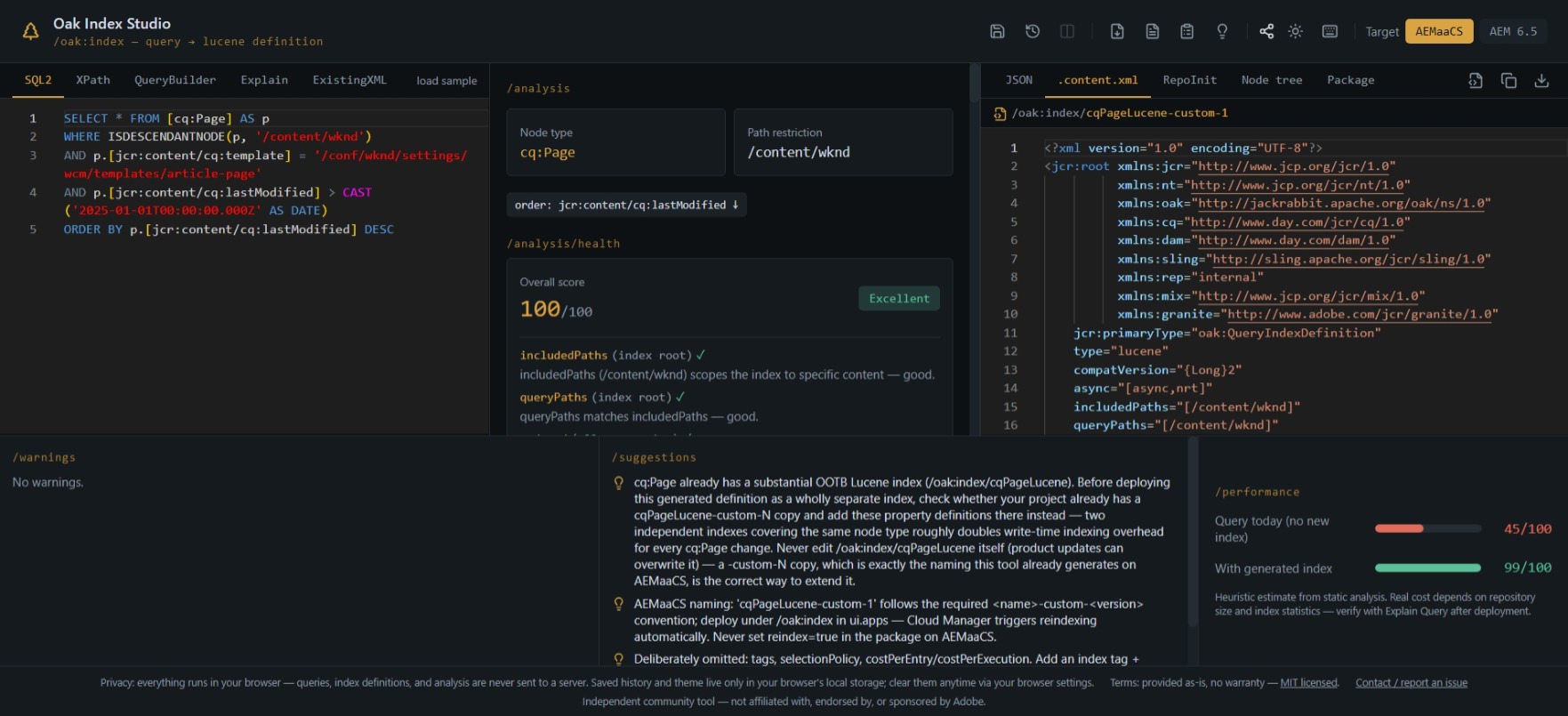
Oak Index Studio takes an AEM query (SQL2, XPath, or Query Builder syntax) and generates a production-shaped Oak Lucene index definition for it, with a written reason attached to every single attribute it sets. Not “here’s some JSON,” but "propertyIndex=true on jcr:content/cq:template because the query filters on it with =, and without that flag the value isn’t stored for lookup at all."
Alongside the generated index, it also gives you:
- A query-quality check. Flags things no index can fix, like a leading-wildcard
LIKE '%value'or a Cartesian join, and explains why before you go looking for a flag that doesn’t exist. - An index health score. Runs the generated definition through 14 checks (path scoping,
compatVersion, async mode, null-check usage, and so on) and explains every deduction. - A heuristic performance estimate. Complexity, a relative cost range, and a confidence score, always clearly labeled as a heuristic and never dressed up to look like Oak’s real
cost=X. - An Explain-plan reader. Paste Oak’s
explainoutput and it’ll tell you why a particular index was chosen or rejected. - An existing-index diff. Paste your current
.content.xmland compare it against what the query actually needs. - Export as
.content.xml, RepoInit, aui.appspackage layout, or JSON, plus Markdown/HTML reports if you want to hand the analysis to someone else.
A note on privacy, because I get asked this every time someone hears “paste your query”: there is no backend. No server, no database, no analytics, no account. Everything (parsing, index generation, every analysis panel) runs entirely client-side, in your own browser tab. Your query, your property names, your paths never leave your machine. The only thing saved anywhere is your own theme preference and analysis history, and that’s in your browser’s local storage, not sent to me or anyone else.
Why not just ask ChatGPT or Copilot to write the index for me?
This is a fair question, and I’d have asked it too. Adobe’s dev community is full of people (myself included) reaching for a general-purpose AI assistant to draft an index definition these days, and honestly, for a quick sanity check it’s not a bad instinct. But there’s a real gap between “sounds plausible” and “matches Oak’s actual rules,” and that gap is exactly where a generic LLM tends to fail quietly.
A general model doesn’t know, unprompted, that a negated LIKE shouldn’t get propertyIndex=true, because Oak can’t bound an exclusion-pattern scan from an index. It doesn’t know that evaluatePathRestrictions=true is dead weight without an actual path restriction in the query, or that ordered=true is completely valid on its own without propertyIndex when a property is only used for sorting. These aren’t obscure edge cases. They’re the kind of thing that looks fine in a generated answer and only shows up as a problem once you deploy and reindex a few million nodes.
Oak Index Studio doesn’t “generate” an answer the way a language model does. It runs a fixed, deterministic rule set against the parsed query, so the same query always produces the same index, and every rule traces back to a specific line in the Apache Jackrabbit Oak documentation, cited right there in the analysis. I actually went through and verified every rule against the real docs while building this (and caught a few of my own earlier assumptions being wrong in the process, more on that below). There’s also a regression test suite locking in the behavior, so a future change can’t silently break something that used to work.
None of that makes it infallible. It makes it consistent and checkable, which a one-off AI-generated answer usually isn’t.
Known issues, and where you still need to review
I’d rather say this up front than have someone find out the hard way. Oak Index Studio is static analysis. It reads your query text; it has no access to your actual repository, its content, or Oak’s real index statistics. A few concrete limits worth knowing:
- The parsers are regex-based, not a full SQL2 grammar. They cover the vast majority of real-world AEM queries correctly, but exotic constructs (
SIMILAR(),NATIVE(),PATH()as a dynamic operand, compoundNOT(a AND b)) aren’t recognized. You’ll get a note about it instead of a silently wrong index. - Type inference is a best guess, from the literal’s shape and the property’s name. Always eyeball the
type=on the generated definition before deploying. - The performance numbers are heuristics, on purpose. Oak’s real query cost depends on live index statistics this tool can’t see. Treat the estimate as “is this query shape roughly cheap or expensive,” not a prediction, and always verify with a real Explain Query against your actual repository.
- "Extend the existing OOTB index" suggestions need an Explain paste to know what index is currently selected. Without it, the tool can only guess from node-type overlap.
Basically: use it to get a correct-shaped first draft with the reasoning laid out, then review it the way you’d review any generated code before it goes anywhere near production.
Try it, and tell me what’s wrong
The tool is live at Oak Index Studio. No signup, nothing installed, paste a query and it just runs.
It’s an independent, community-built project, not affiliated with or endorsed by Adobe. If you hit a bug, find a rule that doesn’t match what you’re seeing in your own repository, or just have a suggestion, email me at [email protected]. I’d genuinely rather hear about it than have it sit there being wrong for someone else too.
You might also like to read
- 1.SegmentNotFoundException in AEM - How to Fix It Safely
- 2.AEM Dispatcher Series 1 - A Developer’s Guide to What It Is and Why You Should Care
- 3.AEM Dispatcher Series 2 - Understanding the `dispatcher.any` File
- 4.AEM Dispatcher Series 3 - Securing Your AEM Site - Deep Dive into Dispatcher `/filter` Rules
- 5.AEM Dispatcher Series 4 - A Developer’s Guide to Dispatcher `/cache` Rules